
4.8
Qualificações no google
logo en
Reset Epson AP - US

Advanced Adjustment Program to Reset Epson SureColor P600 Errors

Follow this instructional walkthrough to configure the Epson P600 utility. Our software ensures that you bypass system blocks and resume printing.

Reset Epson P600 Printer DownloadReset Epson P600 Printer Download Unlimited 1/PC

✓ 100% reset of ink pad counter
✓ Installation transfer twice a year
✓ Automatic delivery in 20 Seconds
✓ Permanently Active 1 PC
✓ Installation tutorial
✓ Total Life-Time guarantee
$5 USD
Pack keys Resets EpsonKeys for multiple models

✓ Choose your Models
✓ All Epson printers available
✓ Packages with 70% discount
✓ Online support
✓ Installation tutorial
✓ Activate it whenever you want
✓ Perfect for assistance
(At the client's company or address)


Shipment

Automatic delivery in 10 seconds every day of the week, 24 hours a day

Warranty

Full product warranty, receive your product or your money back

Windows

Compatible with all Windows - 7 - 8 - 10 - 11

What is the Reset Epson P600 Printer for?

The Epson SureColor SC-P600 Printer Reset is an essential maintenance operation for this professional 13-inch photo printer when it displays critical service messages like "The Ink Absorber is Full" or "A Component's Life has Expired." These alerts are part of the sophisticated protection framework built into the Epson SureColor SC-P600 by Epson engineers to prevent internal ink overflow and safeguard its precision components. For official maintenance guidelines and parts information, the definitive source is always the support section of epson.com.


Epson SureColor SC-P600 Waste Ink Absorber Full Error

How to Address the Flashing Power and Error Lights on an Epson SureColor SC-P600?

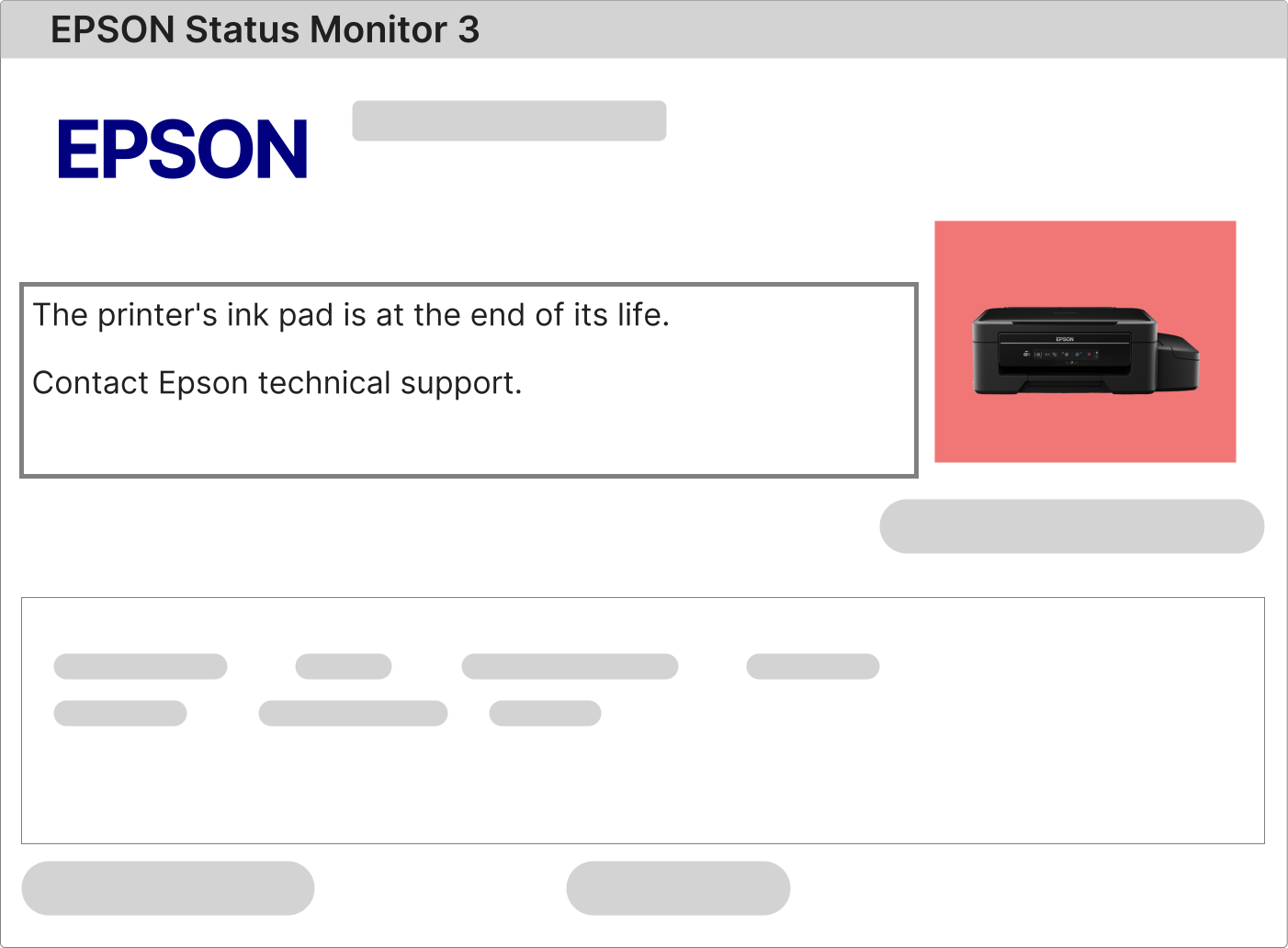
A synchronized flashing pattern of the power and error indicator lights on your Epson SureColor SC-P600 is a clear indication of a system lockout. This state is almost always initiated by the internal microprocessor detecting that the waste ink counter has reached its maximum predefined limit. To obtain the exact error description and code, you must consult the printer's LCD menu under the "Information" or "Error History" section, or use the Epson Status Monitor software on a connected PC.

1 – Power on the Epson SureColor SC-P600 and attempt to initiate a standard print job or a nozzle check from the printer driver settings.

2 – The printer will halt the operation and generate a specific error notification. If this notification explicitly mentions the "Ink Absorber," "Maintenance Box," "Waste Ink Tank," or "Service Request," then performing a Epson SureColor SC-P600 Reset is the required procedure to clear the software lock.

3 – In cases where the printer does not communicate an error to the computer, first ensure you have the correct and updated Epson Professional Print driver installed. You can obtain the latest driver package for the SC-P600 directly from the model's support page at epson.com. After installation, restart both the computer and printer before testing again.

Detailed Procedure for Resetting the Waste Ink Counter on the Epson SureColor SC-P600

Resetting the service counter on the Epson SureColor SC-P600 is a technical process that requires official adjustment software designed for this specific model. The setup requires a computer running a Windows operating system (Windows 7 or later), a direct USB connection to the printer, and the printer must be powered on and in a ready state.

This professional-grade printer utilizes a dedicated service utility, often referred to as the Epson SC-P600 Service Adjustment Program or Reset Tool, which allows authorized access to the protected service menu to reset the waste ink counter values.

1 – Upon successful purchase, you will receive an email containing a secure, time-limited link to download the licensed reset software specifically compiled for the SC-P600 model.

2 – Save the downloaded file, run the installer, and follow the on-screen setup instructions. Once installed, launch the program and input the unique activation key provided in your purchase confirmation email to unlock its full capabilities.

3 – With the software active and the printer connected via USB, follow the precise steps outlined in the accompanying high-resolution video tutorial. This guide demonstrates the exact navigation path within the utility and the corresponding button presses required on the printer's control panel.
4 – After the software confirms the reset operation is complete, it is critical to perform a full power cycle. Turn off the Epson SureColor SC-P600 using the rear power switch, wait for at least 60 seconds to allow capacitors to discharge, then power it back on to reload the firmware with the cleared counter.

Function and Importance of the Waste Ink System in the Epson SureColor SC-P600

The Epson SureColor SC-P600 is engineered with a reliable internal waste ink management system, which includes a high-capacity absorption mechanism to handle ink residuals generated during essential printer functions.

During initial priming, routine head cleaning, and printer calibration cycles, a small amount of ink is purged from the print head to ensure optimal performance and print quality. This waste ink is channeled to an internal absorbent pad or container, as detailed in the technical service documentation available on epson.com.

A digital counter within the printer's firmware meticulously estimates the volume of ink directed to this system. Once the estimated volume meets the safe capacity limit of the absorber, the firmware triggers a mandatory service lock to prevent any risk of internal leakage that could damage electronic circuits or mechanical parts.

To resolve this service lock and return your printer to a fully operational state, a two-phase approach is necessary:

• Physical Service: Depending on your printer's usage, this may involve replacing the internal waste ink pads or a factory maintenance box. For studios with high-volume output, installing a certified external waste ink bottle system is a recommended long-term solution. Compatible kits and instructions can often be found discussed in professional forums or through resellers linked via epson.com.
• Software Reset: Execute the Epson SureColor SC-P600 Printer Reset using our licensed and model-specific software. This communicates with the printer's service mode to reset the electronic counter to zero, thereby removing the firmware-imposed lockout and allowing normal printing to resume.

After your payment is authorized, our automated system will dispatch your digital product delivery email.

Delivery Email for Epson SC-P600 Reset Software and License


This delivery email is your complete resource kit. It includes your personal lifetime software license key, a direct download link for the latest version of the SC-P600 reset utility, and a professionally produced, step-by-step video tutorial that visually guides you through the entire process without any ambiguity.

Adhering to the instructions in this kit ensures a secure, efficient, and successful reset, allowing you to continue producing gallery-quality prints with your Epson SureColor SC-P600 without expensive service center fees.

Epson SureColor SC-P600 Reset: Licensed Professional Software vs. Unreliable Freeware

Protecting Your Investment: The Case for Licensed Reset Software

Substantial Risks Posed by Free or Pirated Reset Tools for the SC-P600:

• Introduces severe security vulnerabilities; many free "cracks" contain hidden malware that can steal sensitive data or disrupt your studio's network.
• Can cause irreversible communication protocol corruption between the computer and printer, leading to a "bricked" state that may only be fixable by an Epson-authorized service center (costs for which are listed on epson.com).
• Often performs a superficial reset that does not address the primary service flag, resulting in the error reappearing after a short period or a fixed number of prints.
• High potential to corrupt the printer's firmware, permanently disabling advanced features, voiding any remaining warranty, and making the printer incompatible with future driver updates from Epson.
Definitive Advantages of the Official Licensed Epson SC-P600 Reset Solution:
• Fully secure and tested software, guaranteed free of viruses, adware, or any malicious code.
• Streamlined, user-friendly interface that performs the reset quickly, minimizing downtime for your professional workflow.
• A one-time purchase provides a permanent, unlimited-use license for your specific Epson SureColor SC-P600 printer serial number.
• Legitimate authorization to use the software on any Windows computer within your own business or personal workspace.
• Direct line to specialized technical support from professionals who understand the SC-P600 platform and can provide remote assistance to ensure success.
• A firmware-safe process that performs the reset within Epson's intended parameters, ensuring no adverse impact on print head health, color calibration data, or overall printer stability.

How to proceed after purchasing the Reset Epson P600 Printer?

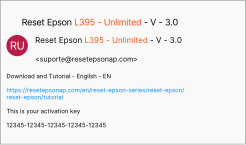
After payment approval, a message like this will be sent to your email.

How to proceed after purchasing the Reset Epson P600 Printer?


After the payment has been approved, a message like this will be sent to your email, containing your activation key, the correct download link for Reset Epson P600 Printer, and an installation video tutorial that will be on the same page of download..

After receiving this email, open the download link and follow step by step how to install and use Reset Epson P600 Printer

Reset Epson P600 Printer FREE VS Reset Epson P600 Printer Paid

What would be the difference between the free program and the paid program since the 2 do the same thing

Let's start with Reset Epson P600 Printer FREE:

• You can't find Reset Epson P600 Printer FREE without viruses, trojan horse, password stealing program or stealing viruses data from your computer or lock access to your computer and claim ransom for it
• Usually Reset Epson P600 Printer GRATIS when reaching the end of the procedure shows an error communicating with Final 68 or 69
• Reset Epson P600 Printer GRATIS does not completely zero the pad counter this when it works
• Immense freeware swap risk and may even disable your printer's operating system

Now we go to the benefits of Reset Epson P600 Printer Paid
• All Epson P600 Resets are virus free
• The installation of Reset is simply and easily a Windows installation
• In the case of Reset Epson P600 Printer Unlimited the warranty is life time, that is, eternal warranty you can format yours computer you can reinstall a new Windows update Windows.
• You are entitled to 2 downloads per year to other Windows PC or notebook devices
• Support with one of our technicians whenever you need it (remote assistance included)
• Having the security that the program will not modify anything on your printer will simply reset the printer's internal pad counter Epson P600
Save
Cookies user preferences
We use cookies to ensure you to get the best experience on our website. If you decline the use of cookies, this website may not function as expected.
Accept all
Decline all
Analytics
Tools used to analyze the data to measure the effectiveness of a website and to understand how it works.
Google Analytics
Accept
Decline
Advertisement
If you accept, the ads on the page will be adapted to your preferences.
Google Ad
Accept
Decline